
Focus Friend App for Android: Why a Companion Beats a Plain Timer
A focus friend app is the idea that accountability works better with a presence, something that notices when you're focused and something that notices when you're not. Human focus friends (body doubling partners, study buddies, accountability partners) work because someone else is watching and that social pressure changes behaviour.
A focus friend app tries to recreate that dynamic digitally, without needing to schedule calls or coordinate time zones.
The Body Doubling Effect
Body doubling is a technique originally developed for ADHD management: working in the presence of another person significantly improves sustained attention, even if that person is doing completely different work and not interacting with you. Their mere presence changes the environment.
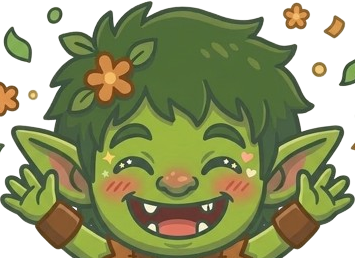
Focus friend apps try to capture this without requiring another human. Apps like Focusmate do this through video co-working sessions. CogniFocus does it through a character companion, the Goblin, that is present during the session, reacts when you drift and changes mood based on how the session goes.
The Goblin is not a person. But the accountability it creates, something that notices and reacts, works for many users in a similar way to having someone nearby.
What the Goblin Does During Your Session
The Goblin has four mood states that shift based on your focus behaviour:
Neutral, present and calm during a clean session. Just there. Watching.
Annoyed, reacts when Shield catches a blocked app opening.
Angry, escalates if blocked apps are opened repeatedly in the same session.
Cheerful, appears when you complete a session cleanly.
The mood change happens at the moment of distraction, exactly when you need something to break the autopilot loop.
How This Differs From a Human Focus Partner
Availability, the Goblin is there whenever you start a session. No scheduling, no time zone coordination.
No social overhead, you don't need to brief a human on your task, apologise for slipping, or manage their expectations.
No judgment, the Goblin goes annoyed, you come back, the Goblin goes neutral. No residual awkwardness.
Weaker social pressure, a cartoon character is not the same as a real person watching. For users with strong enough distraction habits, a human accountability partner will still beat an app. The Goblin works best for automatic, unconscious drift rather than deliberate avoidance.
Recovery Without Shame
One of the most important features of a focus friend app is how it handles slips. Many focus apps treat any distraction as a failure, the session is over, start again. This creates shame spirals, particularly for users with ADHD-style or perfectionist tendencies.
CogniFocus's approach: when Shield catches a distraction, the Goblin reacts, a recovery nudge appears and the session continues. The slip is acknowledged. The session doesn't end. You come back, the Goblin recovers, the session continues.
This recovery loop is what makes the Goblin function as a focus friend rather than just a judge.
Setting Up CogniFocus as Your Focus Friend
- Download CogniFocus from Google Play.
- Add your most-pulled apps to the block list.
- Grant Usage Access and Overlay permissions.
- Start a session when you sit down to work.
- The Goblin appears. It watches. It reacts if you drift. It celebrates when you finish.
Is It Right for You?
CogniFocus works best as a focus friend app for:
- Freelancers and remote workers who lack the ambient presence of an office
- Students studying alone who benefit from something "watching"
- ADHD users who respond to immediate, in-the-moment feedback
- People who want body doubling benefits without scheduling overhead
If you work better with a human body doubling partner, CogniFocus won't fully replace that. But for the session where you can't or don't want to coordinate with another person, the Goblin is the closest available alternative.
Download CogniFocus on Google Play, free to start.
















 Just Hunt